
So, here we are, one year into the iTunes App Store... Where are we, exactly? For some, the App Store has brought fame and riches... for others... not so much.
In January
MacGourmet touch was released, after months of development. How did it go? Well, I can honestly say that considering the amount of time and effort that went into it, it still hasn't broken even. This is one of the main reasons why a) it's not a free add-on and b) why it's priced at $4.99. As much as I'd like to spend time doing things for free or for the "ultra low price of just 99¢", it's just not possible with this app. It can be complicated and every minute of every day has a dollar tag attached to it, and I'm just not at a point where I can give away my time for free... Still, it's sold well enough that I am planning and working on future free updates, so stay tuned.
As a DeveloperOne thing that's killing me, as a developer... is that there is absolutely no way for developers to comment or respond to comments in the App Store without including a rating. This is a huge hole in the process. We'll often see things posted there that could be responded to, but at the same time we don't receive email about the issue... so what are we as developers to do? Post a comment with a 5 star rating? A 3 star rating? If the reviews were all truly reviews that'd be one thing, but often comments are made about problems or misunderstandings that could be cleared up for the poster and other users... but there's no way for us to do that. There is also no way for us to send them email.
Another thing I have trouble with is the loss of control over my product releases. You never know how long it will take for your release to get through the approval system. Sometimes, rejections happen for very simple reasons, but the related rejection can set you back for weeks now. Things have only gotten worse since my January post entitled:
The App Store Product Release Cycle: An Exercise in FrustrationAs a UserAs an iPhone user, I see a TON of apps of dubious quality, and it gets worse every day. More and more one-off 99¢ apps that are clearly money grabs. There are people out there who clearly see the "shot gun approach" as a quick (or possibly the only) way to make money, but all I see is more and more noise. Searching for apps is getting harder and harder.
For all the frustration we developers have with the
App Store approval process, Apple seems to have no problems letting apps of questionable value into the store. And the more of those that get submitted, the longer it takes for all of us to get approval.
A post on pocketgamer.biz, on the
10 lessons learnt about the future of iPhone gaming has some interesting but not particularly surprising observations.
Almost all iPhone game developers we spoke to are increasing their number of releases...
The thinking is so many games are being released on the App Store, there's less point spending a long time polishing your game. Best take a shotgun approach and immediately support any success with fast updates and sequels.
Translation: more and more cheap no-effort dreck to wade through. Honestly, I hate to sound like a "Mac snob" but more and more the App Store is looking like Windows software sites on the web: lots and lots of apps that individually and as a whole, aren't really worth a damn. We don't see this lack of quality and overabundance in the Mac software market. That's always been a difference from the Windows-world. Now, we're seeing this weird convergence of the Mac and Windows applications worlds in the App Store...
PricingAt least the iPhone game-makers seem to realize that the crapware model is unsustainable:
Cheap games are long term suicide
The contrary attitude, particularly from more established developers, states that selling games at 99¢ - despite micro-transaction support - isn't sustainable even for the smallest companies. Of course, there will be some examples of success, but the majority of examples of using 99¢ for both the razor and the razor blades will end in failure.
Craig Hockenberry, in an extensive year one review entitled
Year Two (recommended reading) also says:
I’ve talked about pricing before, but not much has changed. The addition of in-app purchase is great for certain kinds of applications: our upcoming title, Ramp Champ, makes great use of it. But most apps cannot take advantage of this new feature and are left struggling at the ringtone price point.
These low prices are making decisions for us... The problem is that the long-term success of the iPhone platform will be defined by killer apps, not throwaways that you replace on your home screen after a few months.
Potential Piracy IssuesThe App Store also seems to give rise to an easy single point of failure for piracy, again, according to pocketgamer.biz:
Not widely spoken about, especially on the record, but iPhone piracy is certainly out there and growing. One developer told us he thought it was running at about 25 percent on iPhone - compared to 90 percent for his Java games.
From a Mac app sales perspective 25% isn't just bad, it's TERRIBLE. True, there is piracy in the Mac universe too, but we all use a variety of registration systems, so one hack won't typically break the security of all Mac apps... this isn't true when talking about talking about iPhone apps. With the App Store and Apple's security, there is one single point of failure. Break that, and you open up every single iPhone app. This, on the surface is not a huge issue, but when you're talking apps that use servers, bandwidth, etc. all of these pirated apps could be costing small developers a bundle in bandwidth and support charges.
The FutureSo where do I think we go from here? I do really appreciate Apple opening up another venue that Mac developers can use to generate much needed revenue, don't get me wrong. But personally, other than
Cloudburst, a simple 99¢ app that I recently released, and new, improved versions of MacGourmet touch, I don't see myself dedicating much time to iPhone development.
Unless you have an iPhone companion to a Mac app, like MacGourmet touch does, how do you find any kind of traction? Unless Apple finds your app interesting enough to feature, most apps are liable to get lost in a sea of releases. With that in mind, it can be hard to justify spending a lot of time on something, only to see it sink like a stone in a sea of mediocrity.
There's also the matter of coming up with an app that never gets approved... after you've finished it and submitted it to the store. That can be quite a deterrent. I think Craig Hockenberry puts it best in
Year Two when he says:
At present, it’s a crap shoot. When you roll snake eyes, you have no other channel to sell your product and you’ve lost a lot of time and money."
What would help? Quicker turnaround on submissions (it can take up to 3 weeks now, and it's only getting worse), a way for developers to respond to reviewers with problems and questions and better methods to search are just some of the ways that Apple could really improve things. Apple's done an amazing thing in the first year just getting the store up and running and in general working well, but we can only hope that they are listening to our feedback when deciding on the necessary changes for year two.
 Digg This |
  Post to del.icio.us
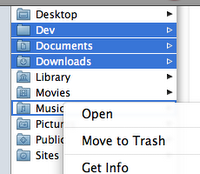 So what's right? Well, in my opinion, there is one major problem with the "focus ring" displayed when the contextual menu pops up. When you don't click on the selection: the original selection remains and the row you clicked on to display the menu gets a focus ring. What is the actual selection that will be used when a command is chosen? Well, it's hard to say. I think a valid argument could be made for either the original, or the new one.